I AM COMPLETELY SELF FUNDED . I GET FEW SAMPLES HERE & THERE BUT MOSTLY I DIDN'T WANT TO BE INFLUENCED INTO SAYING ONLY WHAT THE COMPANIS GIVING FREE SAMPLES WANTED ME TO SAY .

Monday, 21 September 2015

Shopify Introduces the Shop Section on Facebook Pages

Shopify Introduces the Shop Section on Facebook Pages

Shopify Introduces the Shop Section on Facebook Pages
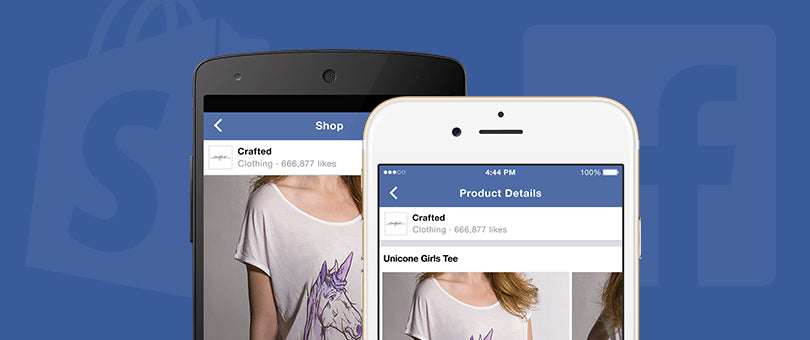
Over the past few months we’ve been working closely with the team at Facebook, and today we’re rolling out the new Shop section on Facebook Pages. The Shop section makes it easy for merchants to showcase their products directly on their Facebook Page. Merchants can then choose to direct shoppers to their online store or to checkout without leaving the Facebook site or mobile app. Buying is safe and secure, and shoppers can optionally choose to save their payment information with Facebook for future purchases. This makes purchasing easier, especially on mobile.
Here’s how easy it is to shop on Facebook:
A small group of Shopify merchants have already been selling their products using the new Shop section, and over the coming weeks we’ll be making it available to all Shopify merchants — at no additional cost.

How is this different than the Facebook Store app I already use?

Existing Facebook Store apps don’t work on mobile devices, which is how most people now use Facebook. As well, existing Facebook Store apps only add a tab to your page, while the new Facebook Shop section appears as a larger section on your main Facebook Page. This means more people will be able to easily discover your products. Finally, the new Shop section includes a subscribe button that lets people get notified when you add new products.

How do I create a Shop section on my Facebook Page?

Shopify merchants will be among the first to get the new Shop section on their Facebook Pages. We’ll be making this feature free and available to all Shopify merchants globally over the coming weeks. Consumers will be able to check out without leaving Facebook when purchasing from eligible merchants or go to their website to purchase.
To see when it’s available for your store, look for this message in your Shopify Home screen:
Once it’s available to you, simply add the Facebook sales channel in Shopify to get started. Then you can choose which product collections you’d like to showcase on your Facebook Page’s Shop section.
Just like with your other sales channels, all orders, products and other information that comes from Facebook will automatically synchronize with your Shopify store.
If you are not already using Shopify, you can sign up here to be notified when the feature is available for your business.

Saturday, 19 September 2015

GET MORE SALES WITH THESE 5 EMAIL RECEIPT MARKETING TACTICS

Get More Sales with These 5 Email Receipt Marketing Tactics

Get More Sales with These 5 Email Receipt Marketing Tactics
Every time someone makes a purchase from your store they get an email receipt.
It’s an amazing way to connect with your customers—but it’s often overlooked as a marketing opportunity.  
Chances are, you’re missing out on sales because of that.
In this post, we’ll take a look at how you can use email receipt templates as a part of your marketing strategy to win additional sales, and stay connected with your customers.
Let's get into it!

What’s Your Email Receipt Missing?

With an open rate of 70.90%, compared to the average 17.19% for regular email marketing campaigns—email receipts are a potential ecommerce gold mine, and it's important that you treat it as such.
It's important to remember that when a customer completes a checkout on your store, their trust is at its fullest.  They’ve already committed to your product and brand.
You can use that moment when a customer opens their email to do a few things:
  • Upsell related products in your store
  • Offer a discount code to incentivize a future purchase
  • Set up a feedback loop to better understand your customers and your checkout flow
  • Promote your social media accounts
  • Let customers share their purchase on Facebook
  • Much, much more
It might not seem obvious, but companies have been using email receipts as a part of their marketing strategy for a while now.  
Even companies outside of the ecommerce space.
Take a look at an email receipt that I received from Uber the other day.  See if there’s anything here that you can draw inspiration from.
Uber is giving their customers a fantastic product experience (travel), and then utilize their email receipts as a marketing tool by:
  • Letting you rate your experience
  • Being able to provide immediate feedback on your "purchase"
  • Offer a referral bonus for sharing with friends
  • Include a valuable, and fun insight into their “product” (travel) using Google Maps
Still not convinced these are powerful?  Here's what Uber has to say about their customer acquisition and marketing strategy:

Uber spends virtually zero dollars on marketing, spreading almost exclusively via word of mouth.  Our virality is almost unprecedented. For every 7 rides we do, our users’ big mouths generate a new rider.
Let’s dig in a bit deeper and take a look at some specific ecommerce email receipt strategies you can start implementing today—and who knows, maybe you'll see some "Uber" growth.

1. Use Email Receipts as a Way to Upsell Related Products

Some big players in the ecommerce industry have already been doing this for a while.
For example, as far back as 2006 Amazon, reported that 35% of its revenues were as a direct result of its cross sales and up selling efforts.  That’s mostly through email receipts.
Here's an example of what an upsell might look like in an email receipt template:
Try incorporating some product up selling in your email receipt template to see if there is an increase in orders.
Here are some examples of other ways you can use this idea in email receipts:
  • Add the option for a subscription purchase
  • Sell related products, or accessories 
  • Offer the option to buy it for a friend as a gift
Additional resources: 
Read more about upselling products to increase sales
Try using an app like Receiptful to create an email receipt template
Learn more about Shopify's email notification templates

2. Offer a Discount Code to Incentivize a Future Purchase

By offering a discount code in your receipt email, you’re offering an incentive for the customer to come back and make another purchase.
study shows that 44% of email recipients made at least one purchase last year based on a promotional email that included a coupon code.
Here's an example of a content block from an app called Receiptful that generates a unique coupon code for each customer that makes a purchase:
Even if the discount is something as small as 5%, or $1 off their next order, savings are savings—and in the mind of a consumer, any savings are good.
Another thing to consider about coupons as a promotional tool, is that they have multiple uses.  You can use them to:
  • Track sales for online and offline marketing campaigns
  • Offer time-sensitive discounts to incentivize another purchase
  • Include them on your physical retail receipts
Additional resources: 
Learn more about the discount code engine in Shopify
Use Receiptful to add content cards and upsells in your order confirmation emails 

3. Promote Your Social Media Accounts to Keep Customers Informed

study by MarketingProfs shows that more than two-thirds of business leaders plan to integrate social media within their email marketing efforts.
So why aren't you?
Simply include links to your social accounts in either the footer, or in a content card on your email receipt template.
Here's an example of how The North Face includes their social accounts in their email receipt templates:
While it is a fairly basic way to use a receipt email—there are other opportunities around social media here as well.  
Some ideas are:
  • Share with 10 friends and get 10% off your next order
  • Every time you refer a friend, you get $1 off your next order
  • Every time you refer a friend and they make a purchase, your next order is free
The number of different variations goes on, so consider testing a few different strategies to see which ones stick and generate sales and high engagement.
Additional resources: 
Use an app like Referral Candy to setup a referral campaign
Try using a service like S Loyalty to create a loyalty program for your customers

4. Get Immediate Feedback from Paying Customers

You can get immediate, valuable feedback from paying customers using email receipts.  Retail stores and restaurants have been doing this for a long time.  Often, they'll include a contest entry by completing a feedback survey.  You can do the same for your online store.
This will give you some insight into the purchasing flow for your store, as well as any pain points a customer may have experienced during the checkout process.
Take a look at this email that solicits feedback from customers of Warby Parker:
Here are some questions that might be worth including to get some feedback from your customers:
  • How did they feel about the overall purchasing process?
  • Did they feel the product was fairly priced?
  • How did they find your store?
  • When do they expect the product to be delivered?
  • How can you improve your checkout flow?
Additional resources: 
Use follow-up emails to ask for feedback from paying customers
Try using an abandoned cart feature to retain customers, and ask for feedback as to why they didn't complete their checkout

5. Have Customers Share Their Purchase on Facebook

Shopping makes anyone feel good.  Research shows that shopping activates key areas of the brain, which boosts moods and triggers the release of brain chemicals that give you a "shopping high".
Using email receipts, you can take advantage of that brief moment when dopamine is released into the brain.
Try to encourage customers to share their purchase on Facebook when they're still feeling excited and have a "shopping high".
Here's an example of what this might look like from the team at AddShoppers:
In a previous post, we discovered how powerful referral campaigns are.  By including this in your email receipt, you're making it easier for customers to refer their friends.
Why is it important to make it easily sharable?  Because customers who have been referred by their friends spend on average 13.4% more.
Additional resources: 
Use a service like Friendbuy to create a referral campaign
Take a look at AddShoppers to create a "Share Purchase on Facebook" campaign

Conclusion

Now that we’ve taken a look at some of the ways you can use email receipts to sell more, how will you incorporate this into your marketing strategy?
Are there any other tactics you can think of?  Let us know in the comments below.


About The Author

Tucker Schreiber is an ecommerce entrepreneur and content crafter at Shopify. He writes to inspire, educate, and inform readers on all things commerce.

MY FAVOURITE ESPADRILLES


Thursday, 17 September 2015

BULGARI

DREAMING OF BULGARI


#DREAMINGOFCHANEL
#DREAMINGOFBULGARI

Here are some of my favourites !
A photo posted by BVLGARI (@bulgariofficial) on

A photo posted by BVLGARI (@bulgariofficial) on

A photo posted by BVLGARI (@bulgariofficial) on


A photo posted by BVLGARI (@bulgariofficial) on


A photo posted by BVLGARI (@bulgariofficial) on


A photo posted by BVLGARI (@bulgariofficial) on


A photo posted by BVLGARI (@bulgariofficial) on


A photo posted by BVLGARI (@bulgariofficial) on

7 Awesome Content Sources That Take the Stress out of Social Media Sharing

7 awesome content Sources that take the Stress out of Social media Sharing.

7 Awesome Content Sources That Take the Stress out of Social Media Sharing
You've been told that in order to build an audience on social media around your brand, you need to be sharing “great content”.
The problem is, you’re busy – and constantly making sure you have interesting stuff lined up to tweet, pin and post can be a challenging and stressful daily task that interrupts your workflow.
But here’s the thing.
Building an audience around your business by creating, curating and sharing great content is important.
It gives you way to provide ongoing value to people outside of the products you sell. It also makes you relevant and gives people a reason to follow you, while providing you with a way to stay in touch with people over time.
And the key to effective content curation that builds and audience (and your business) is sharing content that promotes the lifestyle around your products rather than just your products themselves.
So, how do you keep your social streams topped up with compelling stories and links that will attract an audience, without spending the entire day scouring the web?
To help you out, we've assembled seven awesome resources that take the guesswork out of finding "great content" – including the site that Buzzfeed sources much of its content from.
It’s time to take the stress out of social media sharing.
Note: make sure to check out our bonus tip at the end to learn how you can schedule your social sharing so it takes up a fraction of your time each day.

1. BuzzSumo

BuzzSumo is at the top of this list for a reason:
It enables you to search for relevant content using keywords, and then presents you with the most popular content based on social shares.
Each piece of content is ranked by how widely it was shared on Facebook, Twitter, Pinterest and Google+. In addition, BuzzSumo lets you filter by date and content type, including interviews, videos, infographics, and more.
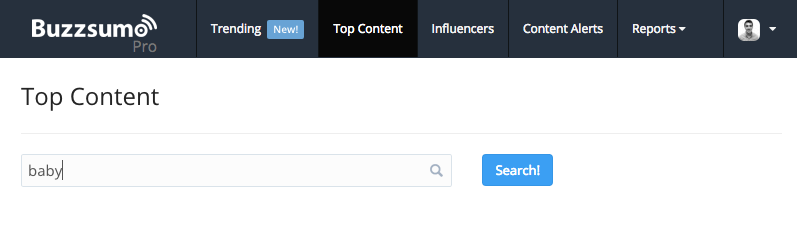
For example, lets say you sell baby clothes online, you'd search for "baby":
Buzzsumo will then show you the most popular stories related to your keyword, based on the timeframe and content type you've selected.
You now have a handy list of some of the most popular content on the web from your industry. The top three results in the above screenshot alone have over one million social shares combined in the last month. 
It's worth mentioning that you should remember to pay particular attention to content that's performing well on the platforms that your audience uses. In other words, if your potential customers hang out on Pinterest, content that has performed well on Twitter may not be as relevant to you.

2. Reddit

Reddit is a massive entertainment, social networking, and news website which spans all sorts of topics, and is home to much of the internet’s most interesting content, images, videos and everyday comical online occurrences.

Most importantly, however, Reddit is also home to “sub-reddits” – categories dedicated to certain topics and interests.

For example, if your brand revolves around fitness, the /r/fitness sub-reddit is where you’ll want to hang out. For fashion related content, it would be /r/fashion.

You'll find that all major topics will have a main sub-reddit like the two mentioned above, and usually a few smaller off-shoot sub-reddits as well.  
To find a sub-reddit for your niche, simply use Reditt’s search feature. Just type a keyword related to your business and Reddit will display related sub-reddits as well as the subscriber count for each:
Next you'll want to head over the sub-reddit of your choice where you can view the most upvoted content from the community there. You can then filter to view the most popular content from the past hour, past 24 hours, past month, past year and all time.
What’s great is that this content has already been proven to resonate with your target audience so chances are it will perform well for you - especially if you aggregate it and package it up in interesting ways. 
Hint: this is exactly what Buzzfeed does for much of its viral content:
If you want use this "Buzzfeed technique", start with a piece of content like this:
Then go through the discussion thread and find the most upvoted comments containing fitness machine recommendations:
Now you've got a list of crowd-sourced fitness machine recommendations that you can take and turn into a Buzzfeed style blog post like "10 High-Impact Weight Machines You Should Be Using in Your Workouts".

3. Feedly

Feedly is an RSS news feed aggregator that makes it easy for you to gather and organize content from around the web. In addition to pulling in content from your favorite blogs, you can also use it to bring in top news content from Google News using Google's free Alerts service. 
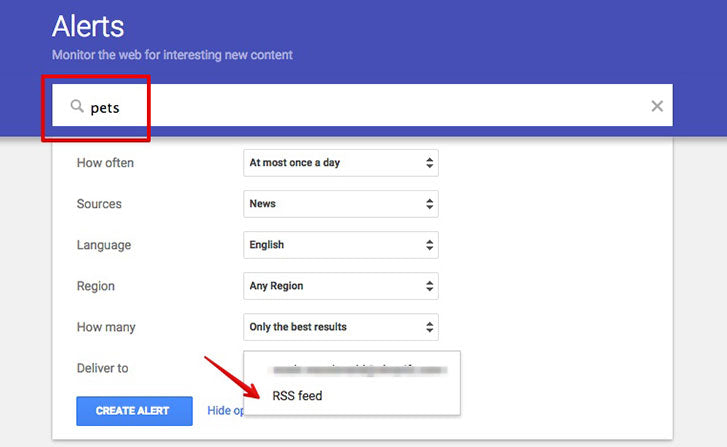
Just head over to Google Alerts, enter your keyword(s), select 'RSS feed' from the 'Deliver to' field and click 'Create Alert'. 
Next, copy the RSS feed url of your newly created alert to your clipboard. 
Head back to Feedly, click 'Add Content', and paste in your new RSS feed url.
Click '+Feedly' and you're all set.
Now you've got a list articles that you can share and use to position your brand as a go-to news source in your industry. 
You can also use Feedly's search feature to discover other popular content sources in your industry: 
When you've found a piece of content you like, you can quickly and easily share it to your social accounts right from Feedly:
Spending a little bit of time setting up Feedly with high quality feeds can save you a lot of time when it comes to finding and sharing great content that will resonate with your audience.

4. Topsy

Similar to BuzzSumo, Topsy allows you to discover popular content on Twitter. However, it has some Twitter-specific features that allow you to filter and drill down a little deeper.
You can search for relevant keywords across links, tweets, videos, photos and most importantly, Twitter influencers.
You can find out what the top influencers within each niche are sharing by sorting their tweets by relevance and date. This comes in handy not just for finding content, but also for finding influencers in your space that you can network with. 

5. Medium Collections

Medium is a free blogging platform with plenty of popularity both among everyday bloggers and industry experts. In other words, a lot of people are writing a lot of good content on it.

The homepage is a nice place to pick up the odd story, but you’ll find the most relevant gems within Medium Collections. Here are some of our favourites.

To find top content on medium for your area of interest, head over to Medium's search page and start typing your keyword. As you type a list of tags will appear on the right hand side:
Click on the most relevant tag and you'll get a page of results containing Medium's top content from that category:
Make sure you bookmark this page so you can come back to it quickly in the future. You can also find agreat list of Medium collections here

6. Content Gems

Content Gems is a platform dedicated to finding great content for you, so you can focus on other tasks.
The platform reviews 200,000+ news sources, blogs, and social media accounts to bring you the very best content in a daily email. Naturally, you can configure your preferences in order to receive relevant content.
You can sign up for a free account and create a custom dashboard around the topics you're interested in and quickly share any piece of content:
I've found that Content Gems can be good for adding a little variety to your content mix and finding stuff that you don't see everywhere else.

7. Learni.st

Learni.st is a great resource to discover and browse curated content covering tens-of-thousands of topics, ranging from niche area of academics to broad interests such as food, health, sports and entertainment.
Major topics like Business, Crafts, Education, How-to and more each have their own boards. Each board has a series of sub-boards that let you discover more specific content from that category.

Scheduling Your Social Content

Now that you know where to find great content for your social media followers to share, it’s time to streamline the entire process of actually sharing it all in the first place.

Believe it or not, managing multiple social media accounts doesn’t have to be hard. You just need to use the right tools for the job at hand.

I recommend Buffer, an app which make your social media campaigns more manageable across Facebook, Twitter, Google+ and Pinterest.
Buffer allows you to schedule your social media posts throughout the day and week, helping you to hitthose peak times with your best content.


After you configure your settings, a Buffer button will be added to your browser, enabling you to quickly add content to your Buffer queue as and when you see it.
In addition to scheduling, Buffer also has a suggested content feed that offers a curated list of popular content in various categories, selected by Buffer staff. This can be a handy resource if you need something in pinch and don't have time to comb through your other feeds.  

Bringing it All Together

While this may seem like a lot to set up, it's really not that bad. If you spend an hour and half gathering your feeds and bookmarking your content sources, you'll have quick and convenient access to great content that you can quickly and easily share across your social accounts.
Take some time at the beginning of the week, or half an hour each morning, to schedule out your content so you don't have to worry about it throughout the day – giving you more time to focus on other important tasks that grow your business.
Just keep in mind, that while scheduling is great, it's not a replacement for genuine, real-time engagement with your audience. You still need to do that :)
However, the above strategiies will make your day-to-day social sharing ore manageable and can help position you as a trusted source of great hand-picked content – which is becoming more and more valuable the noisier the web gets. 
P.S. Have you signed up for free email updates yet? You'll get fresh ecommerce marketing advice delivered to your inbox as soon as it’s published. Just enter your email below. 

About the Author: Mark Macdonald is an ecommerce entrepreneur and content crafter at Shopify. Get more from Mark on Twitter.
I HAVE A DREAM

BLOG POSTS